Type /ship and Mean It
Every PR has a tax — rebasing, linting, changelogs, and docs. A /ship agent skill runs the checklist so you can open the PR and mean it.
- engineering
- ai
- automation
- open-source
Author: John Ryan Cottam5 min read
The code is done. Tests pass locally. You’re ready to open a PR. And then the tax kicks in.
Rebase onto main. Run the linter. Run the type checker. Run the build. Update the changelog. Check if the README needs a new section. Write a PR description that isn’t just the branch name. Push. Open the PR. Hope you didn’t forget something.
Every team has this checklist. Nobody follows it consistently. The senior engineers skip the changelog. The junior engineers forget to rebase. The careful ones do everything right but burn 15 minutes on ceremony that adds zero value to the actual change.
I got tired of it. So I encoded the entire checklist into a coding agent skill and handed it to the AI. Now I type /ship and let it run the list.
I use it on every PR I open. So does my team — five developers, same skill, same pipeline.
What /ship actually does
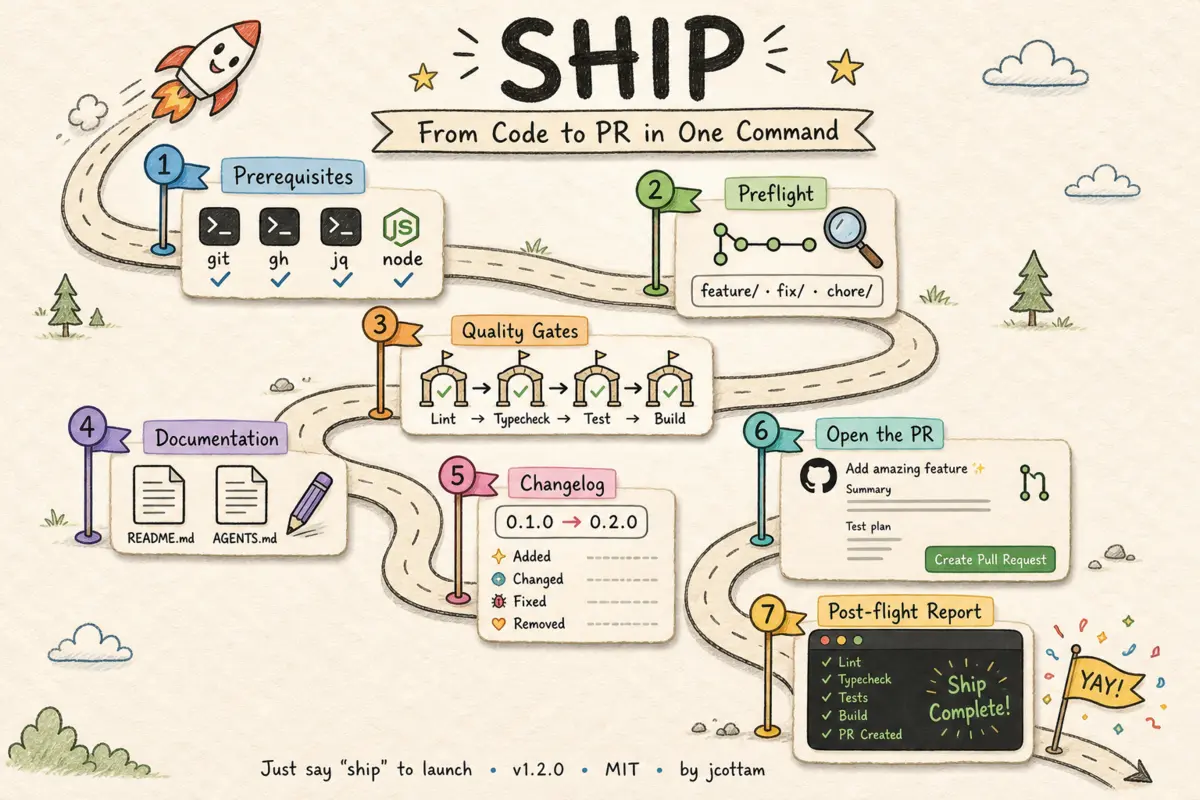
The skill is a six-step pipeline. Each step runs in order, and if any step fails, the agent stops and tells you why instead of pushing broken code.
Step 1 — Preflight. Fetches the default branch, rebases, checks for uncommitted changes, counts commits ahead, and detects whether a PR already exists. If you’re still on main, it analyzes your commits and creates a branch with the right prefix — feature/, fix/, chore/, etc.
Step 2 — Quality gates. Detects your package manager and scans for available gates: lint, typecheck, test, build. Runs them in order. If something fails, the agent attempts to fix it and re-runs. If the fix needs human judgment, it stops and reports.
Step 3 — Documentation. Diffs the branch against main and checks if README.md or AGENTS.md need updates. New env var? New script? Changed API? The agent drafts patches to the relevant sections — you review before they ship. It won’t rewrite the whole file, but it also won’t get every nuance right on the first pass.
Step 4 — Changelog. Reads the commit log, categorizes each change (features, fixes, improvements, breaking, internal), bumps the version, and writes a human-readable changelog entry.
Step 5 — Open the PR. Pushes the branch, creates or updates the PR with a summary and test plan derived from the actual changes.
Step 6 — Post-flight report. Prints a summary: branch name, PR URL, which gates ran and passed, version bump, and any warnings.
One command, six steps, reduced ceremony. You only touch what needs judgment — a conflict, a lint error the agent can’t fix, a doc change worth a second look.
How it works under the hood
The skill is a markdown file. No CLI binary, no npm package, no build step. It’s structured instructions that an AI agent reads and executes — calling shell scripts for the heavy lifting.
Four scripts do the real work.
preflight.sh gathers all the git state in one call and outputs JSON:
{
  "defaultBranch": "main",
  "currentBranch": "feature/add-ship-skill",
  "onDefaultBranch": false,
  "uncommittedChanges": false,
  "commitsAhead": 3,
  "commitLog": "abc1234 feat: add preflight script\ndef5678 feat: add quality gates\nghi9012 docs: update README",
  "prExists": false,
  "pr": null,
  "rebaseStatus": "clean",
  "conflictFiles": []
}
The agent reads this and decides what to do. Uncommitted changes? Stop. On the default branch? Create a new one. Rebase conflicts? Abort and report the files.
detect-gates.sh scans the project for quality gates. It checks for lockfiles to identify the package manager, then looks for lint configs, tsconfig.json, and package.json scripts:
# Lint
if has_script lint; then
  add_gate lint "$PM lint"
elif has_file ".eslintrc*" || has_file "eslint.config.*"; then
  add_gate lint "$PM exec eslint ."
fi

# Type check
if has_script typecheck; then
  add_gate typecheck "$PM run typecheck"
elif [[ -f "$ROOT/tsconfig.json" ]]; then
  add_gate typecheck "$PM exec tsc --noEmit"
fi
Drop the skill into a pnpm project with ESLint and TypeScript, and it finds the right commands automatically. Move it to a Bun project with Biome, and it adapts. No configuration file to maintain.
changelog-bump.sh handles versioning. It auto-detects whether you use CHANGELOG.json or CHANGELOG.md, reads the current version, computes the next one based on the bump level, and prepends the entry. If a previous run was interrupted and left a draft entry at the same version, it patches instead of duplicating.
The fourth script — backfill-pr.sh — is optional. After the PR is created, it writes the PR number and URL back into the changelog entry for traceability.
Why this matters
The interesting thing about /ship isn’t the shell scripts. It’s the pattern.
A coding agent skill is a markdown file that teaches an AI agent how to do something. It’s not code the agent runs — it’s instructions the agent follows, calling whatever tools it needs along the way. Shell commands, file edits, GitHub CLI — the skill just describes the process. Any agent that can read files and run commands — Cursor, Claude Code, Windsurf, Copilot — can follow a skill.
That means encoding your team’s shipping checklist into a skill is the same as writing it down in a wiki — except the wiki page actually executes. Every engineer gets the same process, enforced consistently, without anyone remembering to check a list.
CI runs the gates. The agent runs the judgment.
Yes, /ship and CI overlap on lint, typecheck, and build. That redundancy is intentional — CI catches what slips through after push. /ship catches it before.
The bigger gap is everything CI can’t reason about. Which package manager is this repo using? Does this env var belong in README.md or AGENTS.md? The commit says fix rollup — patch or minor? Should this branch be fix/ or chore/? A rebase just failed on src/api/handler.ts — abort, report, or attempt a resolution?
Shell scripts detect gates. They don’t navigate hiccups. The agent does — read the diff, read the error output, decide whether to stop or retry, patch a half-written changelog entry instead of duplicating it. CI is deterministic enforcement. The agent handles the variable parts of your checklist that don’t compress cleanly into YAML.
What changed on the team
Results TBD but so far so good.
I built Momentum to measure how much my team ships. /ship is the other side of that coin — making each unit of shipping faster and more reliable. Measure the output, then reduce the friction. Both matter.
If your team has a shipping checklist — and every good team does — turn it into a skill. The time investment is a few hours of markdown and bash. The return is every PR, shipped the same way.